Online Safety

Online Safety Resources
for Foundation and Key Stage One
The Adventures of Smartie the Penguin

A story about online safety designed for 3-7 year olds and follows Smartie as he encounters problems in the online world. The story includes a song helping children to remember the importance of telling an adult if they come across an issue online and there are 2 versions of the story
|
Story One covers:
|
Story Two covers:
|
Associated resources include lesson plan, colouring activities and other age appropriate activities www.childnet.com/resources/smartie-the-penguin
Jess and Friends
A three-episode animated series for 4-7 year olds and follows Jessie, Tia and Mo which focuses on identifying and responding to manipulative, pressuring and unhealthy relationships online but delivered in an age appropriate way. Each episode focuses on a different issue and age group
Video One covers watching videos online - created for 4-5 year olds
Video Two covers sharing pictures online - created for 5-6 year olds Video Three covers playing online games - created for 6-7 year olds
Resources include videos, lesson plans, storybooks, songs and posters. Downloadable animations available with subtitles and in British Sign Language (BSL.) Registration to Thinkuknow required (FREE) www.thinkuknow.co.uk/professionals/resources/jessie-and-friends/
Digiduck Stories
The Digiduck collection is designed for 3-7 year olds to help educate children about friendship, responsibility and critical thinking online. Free to download as PDF’s or to read online.
Digiduck’s Famous Friend - Digiduck and his classmates have been set the task of finding out who their special guest at school will be by chatting and asking questions online
Digiduck’s Big Decision - Digiduck has been sent a funny picture of his friend and wonders whether or not he should post it online. A wise owl comes to show him what might happen if he does.
www.childnet.com/resources/digiduck-stories/

Online Safety Resources for
Key Stage Two
Play Like Share
A three video series for 8-11 year olds following the adventures of Alfie, Ellie and Sam as they form a band, learning that the internet can be helpful but they need to use it wisely and safely. The resources are designed to help children spot the signs of manipulative, pressuring and threatening behaviour.
Resources include videos, 2 different workbooks designed for upper/lower KS2 and a resource pack. Videos are available to download with subtitles. Registration to Thinkuknow required (FREE)
Band Runner
A fun game featuring characters from the Play Like Share resource, it will test children’s knowledge about staying safe online by asking them to help the characters make safe choices online. Will help children to distinguish between safe and unsafe online behaviours, and help them feel more confident in asking a trusted adult for help
Can be used in conjunction with the Play Like Share animated videos and a guidance pack for the game, to support delivery as an online safety session, is available from the Thinkuknow website (FREE registration required.) The game can be accessed by visiting the 8-10 year old section on Thinkuknow
Digital Citizenship: Terms and Conditions

The Children’s Commissioner has produced a simplified version
of the terms and conditions that many children and young people agree to without understanding what they mean. In association with TES and Schillings, teaching packs have been produced to enable children and young people to learn more about their rights online when using social media.
The teaching packs can be accessed through the TES website (FREE registration required) while the simplified terms and conditions can be accessed from the Children’s Commissioners website
- www.tes.com/teaching-resources/digital-citizenship
- www.childrenscommissioner.gov.uk/publication/simplified-social-media-terms-andconditions-for-facebook-instagram-snapchat-youtube-and-whatsapp/

Personal Information: Information Commissioners Office
The Information Commissioners Office (ICO) has created a series of three lessons to enable appropriate discussions around
personal information sharing with primary age students.
- Lesson One: What is Personal Information?
- Lesson Two: Who needs to know?
- Lesson Three: Opting Out
- https://ico.org.uk/for-organisations/in-your-sector/education/resources-for-schools/primary-schoollesson-plans/
#LiveSkills
A package of resources for 8-11 year olds focused on live streaming, looking at the features available as well as the risks to children and young people. Separated into 20 minute activities,
with resources available for teens as well, the package will cover:
- Building confidence and self-esteem
- Positive and negative attention
- Critical thinking skills and tactics used by offenders online
The package includes PowerPoint slides, guidance for delivery and information for parents/carers. Available from Thinkuknow (FREE registration required)
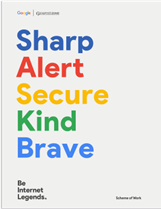
Be Internet Legends
A complete scheme of work designed for KS2 students created collaboratively between Google, Parent Zone and Internet Matters, and is a PHSE Association certified resource. It focuses on key areas of online safety including:
- Personal information sharing
- Scams, phishing and online fraud
- Online security
- Respect and kindness
- Talking about online issues
Includes full lesson plans, downloadable content such as posters and information to
share with parents and carers so they can support their children with consistent safety messages. There are now additional resources available to download covering digital wellbeing. All resources are FREE to access and hard copies can be ordered from Parent Zone when stock is available

Interland
A FREE online interactive game linked to the Google Be Internet Legends scheme of work designed to help children make better
and safer choices online
Education for a Connected World
This framework describes the Digital knowledge and skills that children and young people should have the opportunity to develop at different ages and stages of their lives. It highlights what a child
should know in terms of current online technology, its influence on behaviour and development, and what skills they need to be able to navigate it.
This guide will help you set up parental controls to provide your child with a safer online environment.
Lincolnshire Safeguarding Children Partnership (LSCP) - Online Safety for Parents
Online Safety Information for Parents/Carers:
- 10 Ways Yo Can Share Kindness OnlinePDF File
- What Parents & Carers Need to Know About FIFA 21PDF File
- What Parent & Carers Need to Know About NetflixPDF File
- What Parents and Carers Need to Know About WhatsAppPDF File
- DfE's Advice for Parents on CyberbullingPDF File
- National Online Safety - Online Safety StorybookPDF File
- Internet Matters Booklet - Discovery Digital at Primary SchoolPDF File
- Parent Top Tips To Keep Children Safe Online During School ClosurePDF File
- Thinkuknow Parents Help Sheet: Keeping your Child Safe Online While They Are Off SchoolPDF File
- Instagram - What Parents Need to Know LeafletPDF File
- Factsheet on Snapchat Privacy and Blocking. How to make your Snapchat Private.PDF File
- Momo - What Parents Need to Know LeafletPDF File
- WhatsApp - What Parents Need to Know LeafletPDF File
- Age Rating - What Parents Need to Know LeafletPDF File
- Thinkuknow Parent's Guide to YouTubePDF File
Tik Tok - Information for Parents/Carers
Useful Web Links for Parents:
- Coronavirus (COVID-19): support for parents and carers to keep children safe online More support on specific harms children may experience online during COVID-19
- Lincolnshire Safeguarding Children Partnership (LSCP) Our vision is that children and young people are safeguarded, supported and their lives are improved. We can achieve this by all agencies working together.
- The Association of Adult and Child Online Safety Specialists (aacoss)
- Anti-Bullying from the Diana Award
- Be Internet Legends - Online Safety Join the Legends Family in this short, animated series as they go on a journey to Interland and learn some very important lessons about internet safety along the way.
- Child Exploitation and Online Protection (CEOP)
- Childline
- Childnet's Advice for Parents and Carers How to begin a conversation about online safety.
- Childnet - Keeping Young Children Safe Online Guidance on keeping under-fives safe online.
- Childnet - Parent and Carers Toolkit Offers a toolkit to support parents and carers of children of any age to start discussions about their online life, to set boundaries around online behaviour and technology use, and to find out where to get more help and support
- Internet Matters Expert age-specific advice to prepare and protect your child from a range of online issues, including: sexting, self harm, screen time, radicalisation, pornography, online reputation, online grooming, inappropriate content, identity theft, and cyberbullying
- Internet Matters - Broadband and Mobile Networks Broadband, mobile and WiFi providers offer filters to limit the inappropriate content a child might see. As these typically have to be set manually, you'll find a comprehensive list of parental control guides that we've created to make this process easier to follow with our step by step videos and visual instructions.
- Internet Matter - Gaming Consoles and Platforms Games consoles have features that can limit what games they can play based on the age ratings and can even turn off certain features to allow gaming to be a little safer. To learn more about these features visit this webpage.
- Internet Matters - Parental Controls Give your child a safe space to explore their curiosity online. Internet Matter's step by step guides will help parents/carers to set up the right controls and privacy settings on the networks, gadgets, apps, and sites they use to give them a safer online experience.
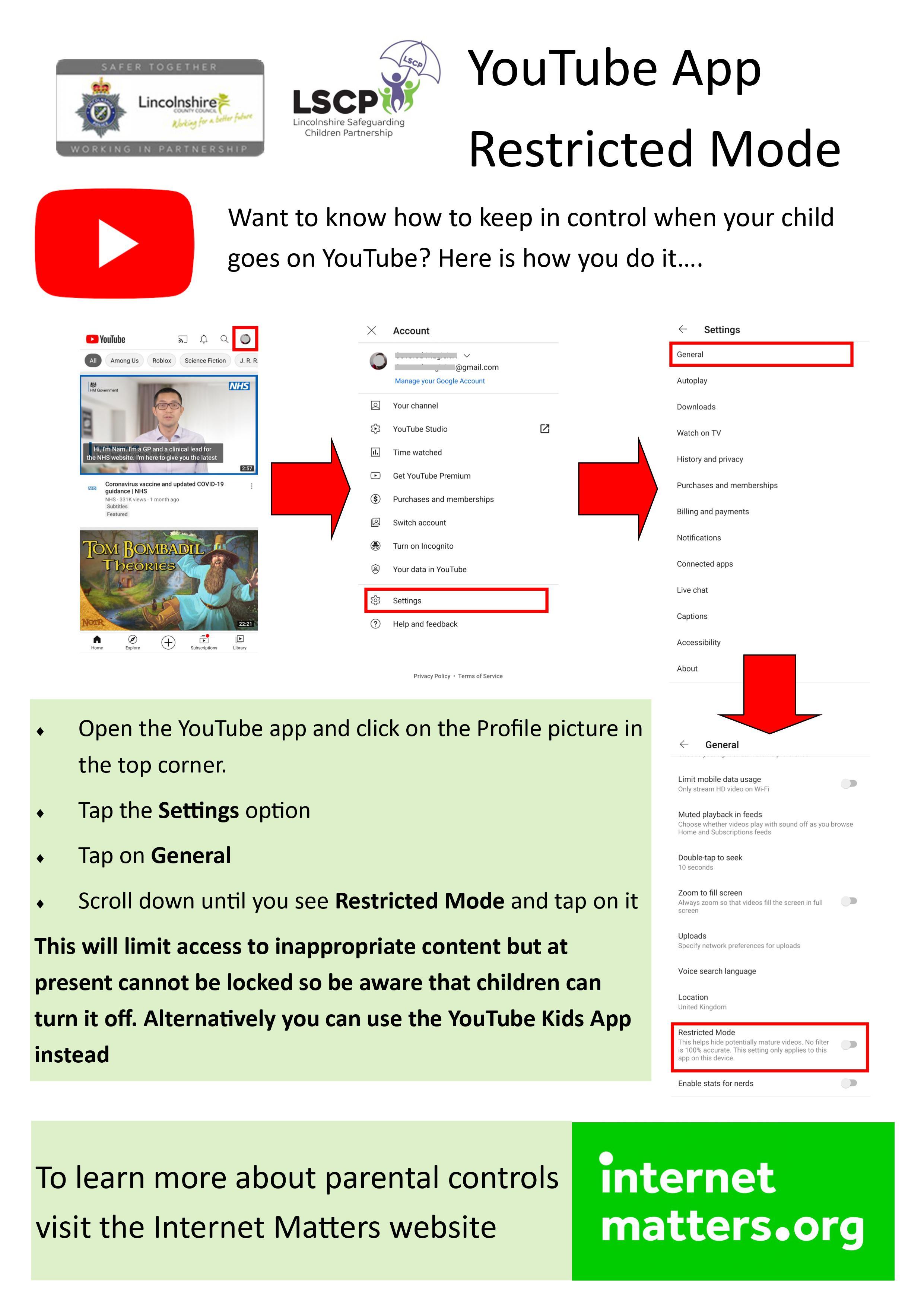
- Internet Matters - YouTube Parental Controls YouTube is a fantastic resource, especially when homeschooling, but not all the content is appropriate for children and not all YouTube channels are made for young audiences. YouTube has an app just for children – YouTube Kids – but many people don't realise that the main YouTube app has a restricted mode. Check out more about how it works here
- Kidscape
- Let's Talk About It (LTAI) Advice for parents and carers to keep children safe from online radicalisation
- London Grid for Learning Support for parents and carers to keep their children safe online, including tips to keep primary aged children safe online
- NSPCC Support for parents and carers from the NSPCC, including a guide to social networks, apps and games
- NSPCC - Keeping Children Safe Online Safety
- Pan European Game Information (PEGI)
- Parent Info A collaboration between Parentzone and the NCA providing support and guidance for parents from leading experts and organisations
- The Parent Zone
- Parent Zone - Pan European Game Information (PEGI) Games Ratings Explained Visit this site for more about game ratings
- TikTok - Safety Center On this page parent/carers will find information and resources to help them understand TikTok, the tools and controls parent/carers and child can enable together, and how to help children have their best experience with the app and community.
- ThinkUKnow Advice from the National Crime Agency (NCA) on staying safe online
- ThinkUKnow - Gaming. What's Appropriate for Your Child Games are also rated based on the content, not how difficult they are. 18 rated games can have very graphic violence, adult language, themes and horror elements. Learn a bit more about appropriate games by visiting this site.
- ThinkUKnow - I'm worried my child might see something inappropriate online It's important to remember that no filters or controls are 100% effective so make sure your child knows that they can, and should, talk to someone if they see or hear anything upsetting online so we can offer them some reassurance.
- ThinkUKnow Online Safety at Home Activity Packs CEOP's simple 15 minute activities suitable for children aged 4-14+ can be done at home and focus on topics including image sharing, live streaming and watching videos on the web.
- UK Safer Internet Centre Tips, advice, guides and other resources to help keep children safe online, including parental controls offered by home internet providers and safety tools on social networks and other online services
Five articles to help keep parents engaged with their child's online activities:
- Gaming: What Parents and Carers need to know
- Sharing pictures of your children online
- Keeping under 5s safe on-line
- Live streaming: responding to the risks
- Using Parental Controls